Don't Buy the Chromebook C340 15 2020 Until You Read This Full Analysis
In the evolving landscape of personal computing, the year 2020 marked a significant pivot point for ChromeOS devices. As remote work and digital learning became the global standard, manufacturers raced to provide hardware that could bridge the gap between casual browsing and professional productivity. Among the most notable entries of that era was the Lenovo Chromebook C340-15. Positioned as a premium mid-range 2-in-1, it aimed to offer the expansive screen real estate of a 15.6-inch laptop with the versatility of a convertible hinge. However, purchasing a piece of technology several years after its initial launch requires a more nuanced perspective than a contemporary review could provide. Potential buyers today must weigh the device's original strengths against the rapid advancement of web-based software and the inevitable march of hardware obsolescence.
The Chromebook C340-15 was designed to appeal to a specific demographic: users who found the typical 11-inch and 13-inch Chromebooks too restrictive for multitasking but weren't ready to invest in high-end Pixelbooks or premium enterprise hardware. Its existence raised an important question for the electronics market—is a 15-inch convertible actually practical, or is it a compromise that satisfies no one? This analysis dives deep into the architecture, performance, and long-term viability of the 2020 model to determine if it remains a smart investment or if its time in the sun has officially set.
The Design Philosophy: Aluminum Meets Plastic
At first glance, the C340-15 presents a sophisticated exterior that punches above its weight class. Lenovo opted for an aluminum lid that lends a sense of rigidity and premium feel to the device, which is essential for a machine of this size. The "Mineral Grey" finish is professional and resists fingerprints better than many of its glossier contemporaries. However, as one moves toward the base of the machine, the materials transition to a high-quality polycarbonate. While this helps keep the weight down to approximately 4.4 pounds, it does result in a slight disparity in tactile feedback between the top and bottom halves of the laptop.
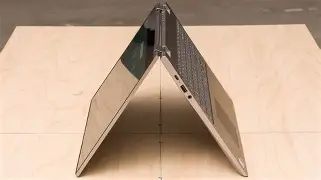
The 360-degree hinge is the centerpiece of the "C" (Convertible) designation. It is stout and well-engineered, capable of holding the massive 15.6-inch display at various angles without significant wobble. That said, the ergonomics of using a 15-inch device as a tablet are questionable at best. Holding four pounds of hardware in the crook of an arm to read an e-book is a task few will find enjoyable. Instead, the value of the hinge lies in "Tent" and "Stand" modes, which are excellent for media consumption or presentations. Buyers should view the convertible nature as a feature for versatility rather than a replacement for a dedicated tablet.
Internal Hardware and Processing Power
Under the hood, the 2020 iteration of the C340-15 predominantly shipped with the Intel Core i3-8130U. This is a dual-core, four-thread processor from Intel’s 8th Generation "Kaby Lake R" family. While an 8th Gen processor might sound dated in the current era of 13th and 14th Gen chips, the efficiency of ChromeOS changes the math significantly. For standard web browsing, Google Workspace tasks, and streaming, the i3 remains surprisingly capable. It provides a much smoother experience than the Intel Celeron or Pentium Gold processors found in budget-friendly alternatives.
The device typically paired this processor with 4GB of DDR4 RAM. By modern standards, this is the most significant bottleneck. Chrome is notorious for its memory consumption, and while 4GB is sufficient for having half a dozen tabs open alongside a Spotify stream, power users will notice the "tab discarding" phenomenon. This is when the OS kills the background process of a tab to free up memory, requiring the page to reload when you navigate back to it. For students or light office workers, this is a minor annoyance; for researchers or developers, it can be a dealbreaker.
Storage options usually hovered around 64GB or 128GB of eMMC 5.1 flash storage. Unlike the NVMe SSDs found in high-end laptops, eMMC is slower, essentially functioning like a high-speed SD card soldered to the motherboard. Because ChromeOS relies heavily on cloud storage via Google Drive, the limited local capacity is often manageable, though it does limit the number of Linux applications or Android games one can install locally.
Detailed Feature Analysis: Display, Audio, and Input
The 15.6-Inch Visual Experience
The display is the primary reason anyone considers this model. It features a 1920 x 1080 Full HD resolution across an IPS panel. The color reproduction is adequate for general use, covering roughly 65% of the sRGB color gamut. While this isn't suitable for professional photo editing, it offers pleasing contrast and wide viewing angles for movie watching. The brightness peaks at around 250 nits. This is perfectly fine for indoor use but makes the screen difficult to view in outdoor settings or near bright windows, especially given the glossy finish necessitated by the touch interface.
Keyboard and Trackpad Performance
One of Lenovo's traditional strengths is keyboard design, and the C340-15 does not disappoint. It features a full-sized keyboard including a dedicated numeric keypad—a rarity in the Chromebook world. The keys have 1.4mm of travel and a tactile "click" that makes long typing sessions comfortable. The inclusion of a backlight is a significant plus for evening work. The trackpad uses a mid-sized Mylar surface. While it lacks the luxurious feel of glass, it is responsive and supports all ChromeOS multi-touch gestures reliably.
Connectivity and Ports
Connectivity is a strong suit for this 2020 model. Unlike many ultra-thin laptops that force users into a "dongle life," the C340-15 offers a healthy selection of ports:
Find top-rated Electronics products at great prices.
See Deals →- Two USB-C 3.1 Gen 1 ports (supporting data transfer, Power Delivery, and DisplayPort)
- One USB-A 3.1 Gen 1 port for legacy peripherals
- A microSD card reader for storage expansion
- A 3.5mm headphone/microphone combo jack
- A Kensington lock slot for security
The inclusion of USB-C ports on both sides of the device is a clever design choice, allowing the user to charge the laptop from whichever side is more convenient relative to the wall outlet.
Comparing the C340-15 2020 to Competitors
To understand the value proposition of the C340-15, it is helpful to look at how it stacked up against its peers from the same generation. This context is vital because many of these machines are now appearing on the secondary and refurbished markets simultaneously.
| Feature | Lenovo C340-15 (2020) | HP Chromebook x360 14 | Acer Chromebook Spin 15 |
|---|---|---|---|
| Processor | Intel Core i3-8130U | Intel Core i3-8130U | Intel Pentium N4200 |
| Display Size | 15.6" IPS Touch | 14" IPS Touch | 15.6" IPS Touch |
| Keyboard | Full with NumPad | Standard (No NumPad) | Standard (No NumPad) |
| Build Material | Aluminum / Plastic | Finished Plastic / Metal | Full Plastic |
| Weight | 4.4 lbs | 3.7 lbs | 4.6 lbs |
The table illustrates that the Lenovo C340-15 occupied a "sweet spot." It offered the build quality and processor of the 14-inch HP flagship but added the numerical keypad and larger screen of the Acer, all while maintaining a slightly better aesthetic than the all-plastic competitors.
Pros and Cons: A Balanced View
No piece of electronics is without its compromises, and the C340-15 is a study in trade-offs. Prospective buyers should consider the following points carefully:
What We Like (Pros)
- The Large, Sharp Display: Having 1080p resolution on a 15-inch screen allows for comfortable side-by-side window multitasking, which is essential for students writing papers while researching.
- Exceptional Keyboard: The snappy feedback and inclusion of the number pad make this one of the best typing experiences on a mid-range Chromebook.
- Quiet Operation: Even under load, the thermal management system keeps the device relatively quiet, making it suitable for libraries or quiet office environments.
- Versatile Hinge: While too heavy for tablet use, the "Stand" mode is phenomenal for watching Netflix or YouTube during a commute or in bed.
- Physical Privacy Shutter: A small but appreciated feature is the manual slider that covers the webcam, providing peace of mind for privacy-conscious users.
What We Don't Like (Cons)
- Limited RAM: With only 4GB of RAM, the device can feel sluggish when running multiple Android apps or dozens of web tabs.
- Subpar Speakers: Despite the large chassis, the downward-firing speakers are thin and lack any semblance of bass. Headphones are a necessity for a good audio experience.
- Slow Local Storage: The use of eMMC rather than NVMe means that larger file transfers and some system updates take longer than they would on a higher-end machine.
- Bulkiness: At 15.6 inches, it does not fit in many standard laptop sleeves or small backpacks, limiting its portability.
- Auto-Update Expiration (AUE): As a 2020 model, its "shelf life" for official Google updates is shorter than that of a brand-new device.
The Critical Buying Guide: Should You Buy It Now?
Purchasing a Chromebook C340-15 2020 today requires looking at three distinct factors: the price, the condition, and the intended use case. This is not a "buy at any cost" device. Instead, it is a "buy if the price is right" tool.
1. Check the Auto-Update Expiration (AUE)
Every Chromebook has a date when Google stops providing ChromeOS updates, security patches, and new features. For the C340-15, this date is generally around June 2028 (though users should verify the specific sub-model). If you are buying this in 2026 or 2027, you are buying a device with very little life remaining in terms of security. As of 2024 or 2025, it still offers a solid window of utility, but you must factor this into the purchase price.
2. Analyze Your Multitasking Needs
If your version of "using a computer" involves 20+ tabs open, a Zoom call running, and Slack in the background, the 4GB of RAM will fail you. If, however, you are looking for a dedicated machine for a child's schoolwork, or a secondary device for the kitchen to manage recipes and pay bills, it is perfectly adequate. The i3 processor is still "punchy" enough for single-tasking with high efficiency.
3. Evaluate the 2-in-1 Necessity
Ask yourself: do I actually need a touch screen and a 360-degree hinge? These features add cost and weight. If you are going to leave the laptop on a desk 99% of the time, you might find better value in a traditional clamshell laptop which might offer a better screen or 8GB of RAM for the same price point.
Real-World Use Cases
To help visualize where this laptop fits into a modern lifestyle, consider these three common scenarios:
Looking for the best Electronics deals on Amazon?
Browse Now →The Budget-Conscious Student
A university student on a tight budget needs a machine for writing essays and attending virtual lectures. The C340-15 is a strong candidate here. The 15-inch screen allows them to have their essay open on one side and their source material on the other without squinting. The reliable keyboard ensures that 2,000-word assignments aren't a chore to type. Since they likely use Google Docs, the 64GB of storage isn't an issue.
The Senior Citizen/Casual User
An older user wants a simple interface for checking email, browsing social media, and video calling grandchildren. The simplicity of ChromeOS combined with the large icons on a 15-inch screen is ideal. The physical webcam shutter provides a sense of security, and the "Tent" mode makes it easy to watch videos without a bulky stand. For this user, the i3 processor is actually overkill, which means the device will feel fast and responsive for years.
The "Second Screen" Home Office
A professional who is already deep into the Google ecosystem wants a dedicated device for their personal life. They use the C340-15 to manage the family calendar, cast YouTube to the TV, and do some light photo browsing. The aluminum lid makes it feel robust enough to be passed around the living room, and the battery life (typically 8–10 hours) means it doesn't always need to be tethered to a wall.
The Technical Verdict
When we look at the Lenovo Chromebook C340-15 2020 through an editorial lens, we see a device that was a leader in its class upon release but is now entering the "sunset" phase of its lifecycle. It is a well-built, handsome machine that provides one of the best large-screen experiences in the ChromeOS ecosystem. Its keyboard remains a reference point for how mid-range laptops should feel, and its port selection is remarkably versatile.
However, the electronics world waits for no one. The 4GB of RAM is arguably the device's greatest sin in a web-heavy world where websites are becoming increasingly bloated with scripts and media. If you can find a refurbished unit in excellent condition for a price that reflects its 2028 expiration date, it represents exceptional value. It offers a level of physical prestige that modern budget Chromebooks, often made of creaky, cheap plastic, simply cannot match.
Buyers should be wary of paying "near-new" prices for this hardware. In the used market, there are often newer models with 10th or 11th Gen Intel processors and 8GB of RAM that can be found for only a slight premium. The "Buy This Only If..." condition for the C340-15 essentially boils down to this: you must prioritize screen size and keyboard quality over extreme multitasking and long-term future-proofing.
Conclusion
The Lenovo Chromebook C340-15 2020 is a testament to how "good enough" hardware can remain useful for a long time. It isn't a powerhouse, nor is it a featherweight travel companion. Instead, it is a sturdy, dependable workstation for the average user. It excels at the basics—typing, watching, and browsing—while offering a touch of class with its aluminum accents. As long as you enter the transaction with clear eyes regarding the RAM limitations and the software support timeline, you will find it to be a faithful servant for your digital needs. It remains a standout example of Lenovo's ability to create hardware that feels substantial and professional, proving that even in the world of affordable Chromebooks, you don't always have to settle for a device that looks like a toy.