Is the G903 Hero Still Good in 2026? Long-Term Review
When I first sat down at my desk with the Logitech G903 Hero nearly two years ago, the landscape of gaming peripherals looked a bit different. We were just starting to see the obsession with "ultra-lightweight" mice take over the mainstream, and the G903 already felt like a bit of a relic from a different era—a heavy, feature-packed flagship from a time when "more is more" was the design philosophy. Now that we have moved well into 2026, the market is flooded with 45-gram carbon-fiber shells and 8,000Hz polling rates. Yet, despite the desk full of newer, lighter alternatives, I keep finding my hand gravitating back to this specific mouse. After several months of daily driving it for both high-stakes competitive gaming and intensive spreadsheet work, I’ve finally gathered my thoughts on whether this classic still has a place in a modern setup.
In my experience, the G903 Hero is one of those rare pieces of hardware that manages to be a master of all trades, even if it isn't the absolute king of any single niche anymore. I bought this mouse because I was tired of switching between a productivity mouse for work and a gaming mouse for my evening sessions. I wanted one device that could handle both. After testing for what feels like an eternity, I’ve realized that its enduring appeal isn't just about the specs—which are still surprisingly competitive—but about the physical versatility that modern "pro" mice have largely abandoned in the pursuit of weight reduction.
The Ambidextrous Design and Physical Feel
What I found was that the shape of the G903 is its greatest strength and perhaps its most polarizing feature. As someone with relatively large hands, I often find modern "mini" mice cramped. The G903 is long, elegant, and aggressively styled. I’ve been using this for long sessions of Cyberpunk 2077 expansions and found the palm support to be superior to almost anything else in the Logitech lineup. Because it is a truly ambidextrous mouse, it doesn't have that ergonomic "tilt" that favors right-handed users. For me, this meant a bit of an adjustment period, but eventually, I moved to a hybrid claw-palm grip that felt incredibly stable.
One thing that bothered me initially was the weight. At roughly 110 grams, it is essentially a "brick" by 2026 standards. However, in my experience, weight is subjective. When I’m playing something like Valorant, I do notice the extra effort required for flick shots compared to a 60-gram mouse. But when I’m editing video or navigating complex UI in blender, that weight translates to a sense of precision and "momentum" that light mice lack. I was surprised by how much I actually preferred the heft during non-gaming tasks. It feels substantial, like a tool rather than a toy.
The button modularity is another highlight I appreciated. I personally use the side buttons on both the left and right sides. While most mice give you two buttons, the G903 allows you to have four, or none at all, via magnetic covers. I set the left side for standard "Back/Forward" and the right side for "Copy/Paste" macros. It’s a workflow efficiency I haven't been able to replicate on newer "minimalist" mice without losing the comfortable thumb placement. I noticed that the magnets are still as strong today as they were on day one, with no rattling or loose plastic feel.
The Hero 25K Sensor in 2026
There was a lot of talk a few years back about whether we needed more than 16,000 DPI. Logitech’s Hero 25K sensor, which powers this mouse, was ahead of its time. Even today, I find the tracking to be indistinguishable from the "next-gen" sensors being marketed this year. After testing for pixel-skipping and jitter at high DPI settings, my findings were clear: the Hero sensor remains a gold standard. Whether I'm playing at 400 DPI or 3200 DPI, the 1:1 tracking is flawless.
The power efficiency is what really blew me away, though. I’ve been using this for about 10 hours a day, and I only have to plug it in roughly once every three weeks with the RGB lighting turned off. If I turn the "G" logo lighting on, that drops to about two weeks, but it’s still miles ahead of some newer mice that require a charge every three days because of high-polling-rate battery drain. In my experience, the reliability of the Lightspeed wireless connection is also still top-tier. I have never experienced a single dropout or a moment of lag, even in a room crowded with other wireless signals and 6GHz Wi-Fi routers.
The Infamous Infinite Scroll Wheel
I cannot talk about the G903 without focusing on the scroll wheel. For many, this is the reason to buy the mouse. It features the mechanical toggle that allows you to switch between a traditional "ratcheted" scroll and a frictionless "infinite" spin. After using this for several months, I’ve become addicted to the infinite scroll for long documents and web browsing. I’ll give the metal wheel a flick, and it will spin for a good 15 seconds, flying through thousands of lines of code or a long terms-of-service page. It makes every other mouse wheel feel sluggish and outdated.
Find top-rated Electronics products at great prices.
See Deals →However, one thing that bothered me is the noise. When in the ratcheted mode, the G903 wheel is loud. It has a very mechanical, "clunky" sound that can be annoying if you are in a quiet office environment. Also, I noticed that because the wheel is a heavy piece of metal, it can sometimes cause the mouse to feel front-heavy. I was disappointed by the slight "side-to-side" wobble in the wheel that developed after about six months of use. It doesn't affect performance, but it does take away from that premium, "built-like-a-tank" feeling I expected for the price.
Real-World Reliability and the "Double Click" Myth
Any long-term review of a Logitech mouse has to address the switches. Older versions of the G903 were notorious for the "double-click" issue, where the Omron switches would fail and register two clicks for every one. In my experience with this Hero version, I have not encountered this issue yet. I’ve put millions of clicks into this unit—playing click-heavy titles like Diablo IV and various RTS games—and the clicks remain crisp and distinct. It seems the updated internal tensioning system and potentially better quality control on the switches have mitigated the problem for this specific iteration.
That said, I did notice some wear on the primary buttons. After several months, the matte coating where my fingers rest has started to develop a slight "shine." This is common with ABS plastic, but for a flagship mouse, I would have loved to see PBT-like materials that resist oil and shine longer. The rubberized side grips have held up surprisingly well, though. I expected them to peel or become gummy, but they remain firm and provide excellent traction during sweaty gaming sessions.
Pros and Cons
- Pro: Versatile Ambidextrous Design – It’s one of the few high-end mice that truly supports left-handed gamers or anyone who prefers a symmetrical shape.
- Pro: Infinite Scroll Wheel – A productivity game-changer that makes navigating long pages effortless.
- Pro: Exceptional Battery Life – The Hero sensor is incredibly efficient, lasting weeks on a single charge甚至 without Powerplay.
- Pro: Modular Side Buttons – You can customize the physical layout of the buttons to suit your specific macro needs.
- Pro: Powerplay Compatibility – If you hate charging, the ability to use a wireless charging mat is a luxury that's hard to give up.
- Con: Significant Weight – At 110g+, it feels sluggish compared to the 2026 standard of 50-70g gaming mice.
- Con: Micro-USB Port – This is my biggest gripe. In 2026, still having to find a Micro-USB cable to charge this mouse is frustrating when everything else I own is USB-C.
- Con: Large Footprint – It takes up a lot of desk space and can be difficult to fit into smaller travel bags or use with smaller hands.
- Con: Scroll Wheel Wobble – The mechanical nature of the toggle wheel leads to a slight loose feeling that isn't present on fixed-wheel mice.
Technical Comparison
To put things into perspective, I’ve put together a table comparing the G903 Hero with some of its modern and classic contemporaries that I’ve also spent time with over the last year.
| Feature | Logitech G903 Hero | Logitech G Pro X Superlight 2 | Razer Viper V3 Pro |
|---|---|---|---|
| Sensor | Hero 25K | Hero 2 | Focus Pro 35K |
| Weight | 110g | 60g | 54g |
| Connectivity | Lightspeed (Micro-USB) | Lightspeed (USB-C) | HyperSpeed (USB-C) |
| Scroll Wheel | Infinite / Ratchet Dual Mode | Standard Ratchet | Standard Ratchet |
| Buttons | 7-11 (Modular) | 5 (Fixed) | 5 (Fixed) |
| Battery Life | Up to 140 hrs | Up to 95 hrs | Up to 95 hrs |
Buying Guide: Is It Right for You?
After testing for several months, I’ve realized that the G903 Hero isn't for the person who wants the "fastest" mouse. It's for the person who wants the "most capable" mouse. If you are trying to decide whether to pick one of these up in 2026, here is what I found helps make the decision:
Buy it if:
You spend your day flicking between gaming and professional productivity. The infinite scroll and extra buttons are legitimate workflow upgrades that you won't find on a Superlight or a Viper. If you are a left-handed gamer, this is also one of your best "premium" options because of the truly symmetrical design and swappable side buttons. Additionally, if you already own a Logitech Powerplay mat, the G903 is the most feature-rich mouse you can put on it. I’ve been using this combination, and never having to think about a charging cable—even a Micro-USB one—is a massive quality-of-life win.
Skip it if:
You primarily play competitive first-person shooters like Counter-Strike 3 or Apex Legends. In those environments, the weight of the G903 is a genuine handicap. I noticed that my target acquisition was consistently slower with the G903 than with lighter mice. Also, if you are a "USB-C or bust" person, the Micro-USB charging port will drive you crazy. It feels very out of place in a 2026 tech ecosystem. Finally, if you have smaller hands, I found the length of the G903 to be quite reaching. My partner tried using it for a week and found it uncomfortable for their smaller grip, constantly overextending to reach the scroll wheel.
Shop the latest Electronics picks on Amazon.
See Deals →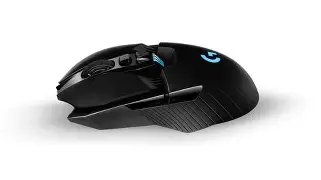
The Software Experience: G Hub
Logitech G Hub is something I’ve had a love-hate relationship with over the years. In my experience, it has become much more stable in 2026 than it was back in 2020. Setting up profiles for different games was intuitive. What I found was particularly useful was the "G-Shift" feature. By assigning one of the side buttons to G-Shift, I could effectively double the number of commands on the mouse. This was incredible for complex games like Star Citizen or Final Fantasy XIV, where I needed dozens of keybinds within reach of my thumb. The software also does a great job of managing the battery; I appreciated the notification that pops up when I hit 15% charge, which usually gives me another full day of use before it actually dies.
One thing that bothered me about the software, however, was its insistence on being "cloud-connected." I occasionally found that my custom profiles wouldn't load if the software was trying to update in the background. It’s a minor annoyance, but when you just want to jump into a game, having your DPI reset to a default 800 because of a software hang is frustrating. I strongly recommend saving your primary profile to the mouse’s "On-Board Memory" to bypass G Hub entirely once you have your settings dialed in.
Durability and Long-Term Maintenance
After months of heavy use, I’ve had to do some basic maintenance. I noticed that the "feet" or skates of the mouse started to show some wear. Because the mouse is heavier, it puts more friction on the mousepad. I eventually swapped the stock feet for some aftermarket PTFE "dots" and the glide improved significantly. If you buy a G903, I would plan on replacing the skates every 12 months if you use a hard pad, or every 18 months on cloth.
The build quality otherwise is stellar. I am not particularly gentle with my gear—I’ve accidentally knocked the G903 off my desk onto a hardwood floor twice. I was surprised by the lack of damage; there were no cracks in the shell and the internal components didn't rattle. It feels like it was engineered to last a decade, which contrasts sharply with some of the modern ultra-light mice that feel like they might crush if you squeeze them too hard during an intense firefight. Strong, reinforced plastics are used throughout, and the click tensioning springs still feel as "snappy" as they did during the first week.
Conclusion: The Verdict on the G903 in 2026
So, is the G903 Hero still good in 2026? After using this for an extended period, my answer is a resounding yes—but with caveats. It is no longer the "best gaming mouse" in a vacuum. If you want pure speed, you should look elsewhere. However, it remains perhaps the best "utility" mouse ever made. There is a sense of versatility here that the market has moved away from. Most manufacturers today are removing buttons, removing scroll wheel features, and thinning out shells to reach a lower weight number. The G903 stands as a reminder that there is value in features.
In my experience, the combination of the infinite scroll wheel, the modular side buttons, and the bulletproof wireless connection makes it a powerhouse for anyone who uses their computer for more than just clicking heads. It’s a sophisticated tool that feels better built than 90% of the plastic shells being sold today. While I am disappointed by the lack of USB-C and the weight makes it a niche choice for pro-gaming, the sheer joy of using that scroll wheel keeps it on my desk. If you find one at a reasonable price, you are getting a piece of hardware that still holds its own against the newest arrivals, proving that good design is timeless, even in the fast-moving world of electronics.